
OnlyFans Page Pacing: Spotting Active vs Quiet
Finding a free OnlyFans page that actually stays active is harder than it sounds, because the platform gives you no feed, no directory and no activity badge. A page can look busy on the day you subscribe, then go quiet for weeks while your renewal keeps charging. Pacing is the word for how often a page posts, how quickly messages get answered and how regularly new media appears. If you learn to read pacing signals before your renewal date, you avoid paying for silence.

This article explains how subscribers can identify quiet or inactive pages through pacing signals before renewal charges arrive. It covers the visible activity markers worth checking, the timing that matters most, and the decisions to make when a page slows down. Everything here uses public profile information and platform behaviour, not private data or guesswork about individuals.
Why pacing matters
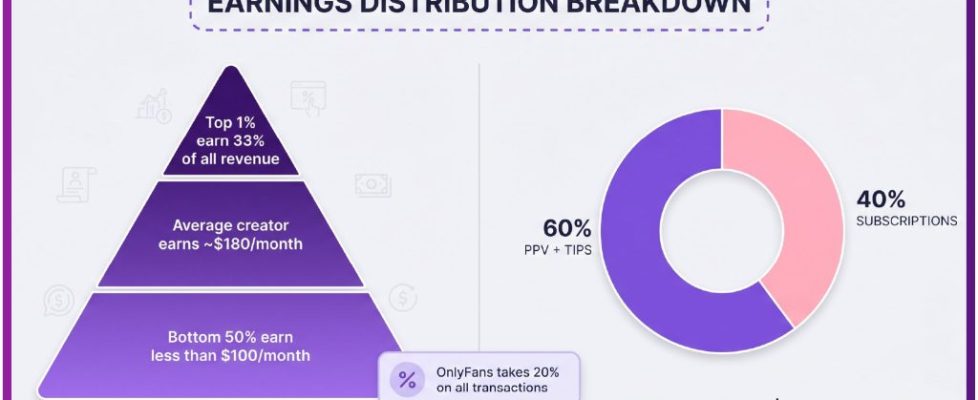
A silent page still costs you money at renewal. The subscription renews automatically at the same price unless you cancel, and the platform takes its 20% cut on subscriptions, tips and pay-per-view messages regardless of whether the creator posted anything that month. The creator keeps 80%, but that split only matters to the creator. For you, the relevant fact is simpler: an inactive page bills the same as an active one.
Pacing is the only reliable signal you get for free. Post counts, media totals, recent upload dates and message response habits are all visible or quickly observable. None of them are proof of future activity, but together they show whether a page is being maintained or abandoned.
| Signal | Good example | Poor example |
|---|---|---|
| Recent post date | New upload within the past week | Last upload more than a month ago |
| Media count trend | Count rises between two visits | Count identical after three weeks |
| Message reply | Reply within a day or two | No reply after several days |
| Promotion updates | Price or offer changed recently | Same listing text for months |
Ranking services such as BestOnlyFans exist partly because the platform has no built-in discovery feed or directory. A comparison site can line up public profile prices, promotions, activity and media counts side by side, which is faster than opening pages one at a time. That comparison is descriptive, not predictive, so treat it as a starting point for your own checks.
Tip: screenshot the media count and post date on the day you subscribe. When renewal approaches, compare the numbers. The difference tells you more about pacing than any promotional banner.

Activity signals
Check visible activity signals before you judge a page. Most of them sit on the main profile or become obvious within a couple of visits. The point is to gather several signals rather than rely on one.
A single recent post proves little. A page that posted ten items last Tuesday and nothing since may be quieter than a page posting twice a week without gaps. Look for rhythm, not volume.
Free pages work differently here. A free page sets the price to $0 and earns through pay-per-view messages and tips rather than subscriptions. That means the creator has no renewal income to protect, so pacing can vary widely. Some free pages post frequently to drive pay-per-view purchases, while others go silent and rely on occasional messages.

Pace versus category
Some categories look quiet even when the creator is active. A page built around long-form sets may post once a week but publish a large batch each time. Another page may post short updates daily with almost no media attached. Neither pattern is automatically better, but the second one produces more visible activity markers.
Weekly batching also creates false quiet. If you subscribe two days after a batch and check again three days later, you may see nothing new and conclude the page is dead. The timing of your checks matters as much as the page itself.
Practical steps, in order:
- Note the date of the newest post when you subscribe.
- Visit again at the halfway point of your billing period.
- Record the media count on both visits.
- Send one short message and note how long a reply takes.
- Compare the pattern against what the page description promises.
- Decide before renewal, not after.
Pages in the typical paid range of $4.99 to $15 tend to sit in the middle of this pattern. They are cheap enough that subscribers tolerate a slow month, which reduces the pressure on the creator to post constantly.

Timing checks
The best time to check pace is roughly halfway through your paid period. Checking on day one gives you the creator’s best foot forward. Checking on the last day gives you no time to act. The midpoint gives you a fair sample and room to cancel.
Set a reminder a few days before the renewal date as a second check. If the media count has not moved since your midpoint visit, you have a clear answer about the past few weeks.
Costs to expect month by month:
- Minimum paid subscription: $4.99 per month
- Common entry-tier pricing: $4.99 to $15
- Typical averages reported across paid pages: $5 to $10
- Upper end of the paid range: $49.99 per month
- Free pages: $0 subscription, with spending on pay-per-view messages and tips instead
There is no base subscription price below $4.99. A promotional first month may dip below that figure, but it is a temporary offer, not a standard rate. If a listing claims a permanent sub-$4.99 price, read the terms carefully. A practical starting point is bestonlyfans streamer, which lists pages by the signals above.

Comparison table
The three broad patterns below cover most pages. Use them as rough categories rather than fixed rules, because a page can move between them over time.
| Pattern | Post rhythm | Media growth | Reply habit | Renewal view |
|---|---|---|---|---|
| Active | Several posts per week | Steady increase | Within a day | Usually worth keeping |
| Steady | Weekly or in batches | Slow but visible | Within a few days | Depends on your budget |
| Quiet | Nothing for weeks | No change | No reply | Cancel before renewal |
Steady pages are the hardest call. They are not abandoned, but they may not deliver enough during a given month to justify the charge. Compare the price against what you actually opened in the past period.
Another ranking service angle worth knowing: BestOnlyFans groups pages by public profile information, which makes it easier to spot a steady page before you commit. It cannot tell you how a creator will behave next month, and it does not track private spending.

Renewal decisions
Answer these questions honestly before you let a quiet page renew.
- Did the media count change since I subscribed?
- Did I open the page more than once this period?
- Was my message answered, and how quickly?
- Is the price still reasonable for the activity I saw?
- Would I subscribe again today at this price?
- Can I afford the renewal alongside my other subscriptions?
If two or more answers point toward inactivity, cancelling is the reasonable move. You can always resubscribe later if the page becomes active again, and the price may even be lower through a promotional offer.
Remember how pricing changes affect access. When a creator raises the subscription price, auto-renew stops for existing subscribers. Your current access lasts until the paid period you already bought ends. That gives you a natural exit point, but it also means a price rise can quietly end your subscription without you cancelling anything.
Cancelling quiet pages
Cancelling does not remove access you already paid for. Your subscription stays live until the end of the current billing period, so you keep everything you paid for and simply stop the next charge.
Mistakes to avoid when cancelling:
- Cancelling and assuming the page disappears immediately
- Forgetting to cancel a second subscription to the same creator
- Waiting until after the renewal date to act
- Cancelling during a promotional first month without checking the terms
- Ignoring auto-renew settings after a price change
Turn on two-step authentication if you have not already. Cancelling a subscription is a routine account action, but account security matters regardless of how many pages you follow.
Keep a short note of what you paid and when each subscription ends. A simple list prevents the surprise of a charge you forgot about.
A credit card adds a chargeback route that a debit card does not.
Replacement follows
Once you cancel a quiet page, replace it with one that shows clearer pacing. Stay in the same category so the comparison is fair, and apply the same midpoint check to the new page.
Comparison sites help here. BestOnlyFans lists public profile prices, promotions, activity and media counts together, so you can shortlist candidates without opening each page. A third mention for clarity: this type of ranking service compares public listing details only and does not report private spending, earnings or outcomes.
For a broader view of pacing in practice, see this overview of a bestonlyfans streamer comparison approach, which follows the same public-signal method described above.
- Set your midpoint reminder for the new page at the same time you subscribe.
- Two checks per month, one at the midpoint and one before renewal, are enough to catch most quiet pages before they charge you again.
FAQ
Can a page look inactive but still post regularly?
Yes. Creators who publish in weekly batches can appear quiet between batches, so check the media count over a full billing period rather than a few days.
Does cancelling remove access straight away?
No. Your access continues until the end of the paid period you already bought, and only the next renewal charge is stopped.
Why does my renewal stop when the price changes?
When a creator raises the subscription price, auto-renew ends and your existing access runs until the current paid period finishes.
Are free pages easier to judge?
They follow different rules because income comes from pay-per-view messages and tips, so activity can vary more and pacing signals are less consistent.